
What this area is for
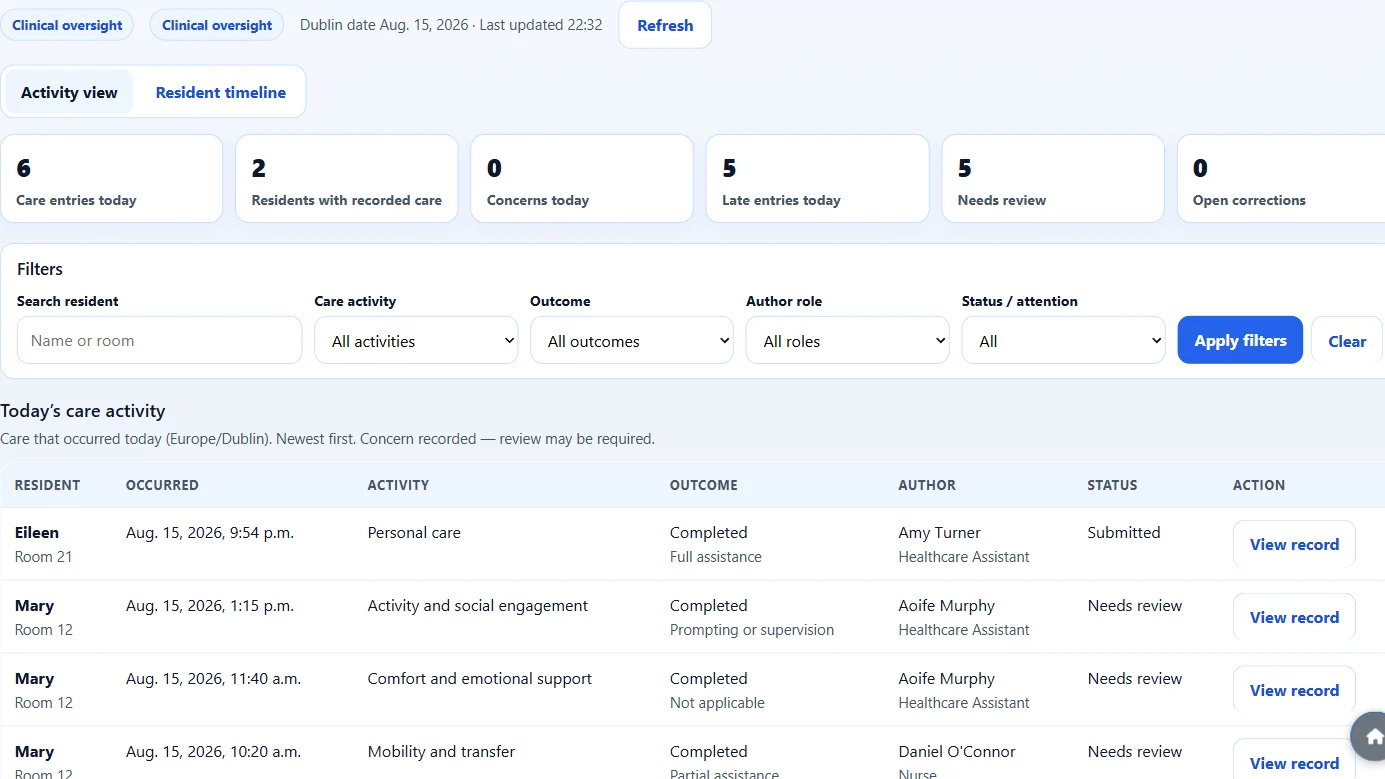
Today’s Care is the manager view of Daily Care that has already been submitted.
Use it to answer questions such as:
- Who has had care recorded today?
- Were any concerns recorded?
- Which entries were late?
- What does one resident’s day look like?
This page is read-only. You can look. You cannot edit, delete, or approve a record from here.
Today’s Care is like looking at the care book after staff have written in it. It does not write the care for them, and it does not flash live like a television.
Who can open it
You can open Today’s Care if you have:
- an ÁitFoirne management login, and
- an active Clinical leadership role: Clinical Manager, Director of Nursing, Assistant Director of Nursing, or Person in Charge.
Healthcare Assistants and ordinary Nurses use Care Portal, not this page.
Step-by-step: open Today’s Care
- Sign in to ÁitFoirne with your own management login.
- Select Enter Clinical.
- In the Clinical menu, select Today’s Care.
- Read the summary cards at the top. They count today’s submitted care.
- Scroll the list to see who recorded care, for which resident, and at what time.
- Select Refresh if you have been on the page for a while and want the newest records.
- Open a row if you want to read one record in more detail.
The page also shows a Last updated time. If someone has just submitted care on a tablet, refresh the page. It is not live streaming.
How to filter the list
You can narrow the list without changing any records.
Use the filters to look at:
- a resident name
- a care activity
- an outcome
- Healthcare Assistant or Nurse
- Concerns
- Late
- Needs review
- Open corrections
- Entered in error
If you type something the page does not understand, it will ignore that filter and keep the rest. That is normal.
Needs attention can also show older unresolved items from recent days. Those are kept separate from today’s activity counts, so today’s numbers stay honest.
Step-by-step: open the Resident Day Timeline
- Stay in Today’s Care.
- Switch to the Resident timeline view.
- Choose the day if you need a day other than today. Use Previous, Today or Next.
- Find the resident by name or room.
- Read the events from the start of the day to the end of the day.
- Tap an event to open the same read-only detail page.
- Use Back to Resident Day Timeline to return.
A blank lane means No Daily Care has been recorded here for this period. It does not mean the resident had no care needs. It only means nothing was submitted in Care Portal for that time.
What the timeline does not show
The Resident Day Timeline shows submitted Daily Care only.
It does not show:
- medicines
- care-plan tasks that were planned but not recorded
- diagnoses
- GP or next-of-kin details
- missed or overdue care guesses
If a lane is empty, ask the floor team. Do not assume the timeline has “missed” something by itself.
What you cannot do on these pages
From Today’s Care or the timeline you cannot:
- edit a Daily Care record
- delete a record
- mark it reviewed
- approve a correction
- create an incident
- send a notification
Those actions stay in Care Portal or in the matching Clinical office page.
Questions people ask
A Healthcare Assistant says they just submitted care, but I cannot see it.
Select Refresh. Wait a moment and look again. Check you are on today’s date. If it is still missing, ask them to stay on the success screen so you can confirm it was submitted.
Why are yesterday’s concerns still on the page?
Older items that still need attention can appear in the Needs attention list. They are not mixed into today’s completed-care counts.
Can I watch Today’s Care update by itself all day?
The page can quietly refresh about once a minute while it is open on today’s date. It is still not live streaming. If you need to be sure, select Refresh.
I can see Today’s Care but I cannot give a PIN.
That is expected for Director of Nursing, Assistant Director of Nursing and Person in Charge. PIN management is on Clinical Access, and that belongs to the Clinical Manager.