
What this area is for
Clinical Access is where the Clinical Manager chooses which Healthcare Assistants and Nurses may use Clinical, and gives each person their own Care Portal PIN.
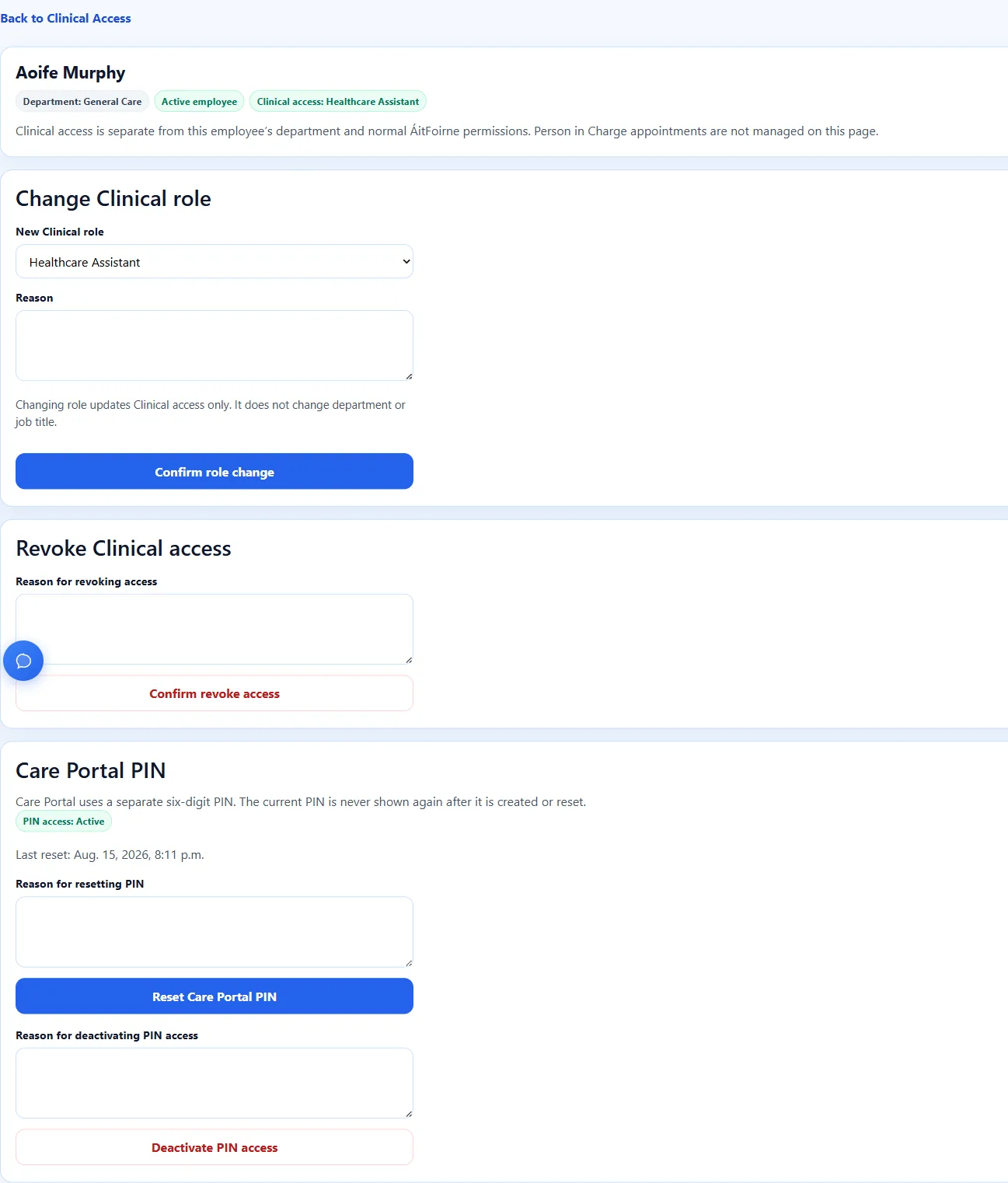
This page does not change a person’s job title, department, or rota. It only changes Clinical access.
A Care Portal PIN is like a locker key. Each person has their own key. Never write it on a whiteboard, never put it on a shared note, and never ask staff to share it.
Before you start
- You must be the Clinical Manager.
- You must open Clinical from your ÁitFoirne management login.
- The staff member must already exist as an employee in ÁitFoirne.
- Director of Nursing and Assistant Director of Nursing can review care, but they cannot create PINs unless they are also the Clinical Manager.
If you cannot see Clinical Access in the Clinical menu, you are not the person who can change access. Contact ÁitFoirne support rather than asking someone to share a PIN.
Step-by-step: grant Healthcare Assistant or Nurse access
- Sign in to ÁitFoirne and select Enter Clinical.
- In the Clinical menu, select Clinical Access.
- Find the employee. Use the search box if the list is long.
- Open that employee.
- If the badge says No Clinical access, select the role Healthcare Assistant or Nurse.
- Write a short reason, such as “Starting Care Portal on the day shift”.
- Select Confirm and grant access.
- Check that the badge now says Clinical access: Healthcare Assistant or Clinical access: Nurse.
Only those two roles can use Care Portal. Do not try to give Care Portal to a manager role on this page.
Step-by-step: create the Care Portal PIN
- Stay on the same employee page.
- Scroll to Care Portal PIN.
- Write a short reason, such as “First PIN for Care Portal”.
- Select Create Care Portal PIN.
- The PIN is shown once. This is the only time the system will show it.
- Ask the staff member to come to you, or stand with them, and let them see the PIN themselves.
- Ask them to memorise it, or write it in their own private place. Do not keep a copy on your desk.
- Close the one-time PIN page when they have it.
The current PIN is never shown again after it is created or reset.
If someone forgets their PIN
- Open Clinical Access.
- Open the employee.
- Under Care Portal PIN, write a reason such as “Staff forgot PIN”.
- Select Reset Care Portal PIN.
- Show the new PIN once, privately, to that staff member only.
- The old PIN stops working straight away.
If someone should no longer use Care Portal
Use the matching button on the same page:
- Confirm revoke access — removes Clinical access for that Healthcare Assistant or Nurse.
- Deactivate PIN access — stops the PIN without changing the Clinical role.
- Reactivate PIN access — turns a stopped PIN back on.
- Confirm reactivate access — restores a revoked Healthcare Assistant or Nurse role.
If a person leaves the home, revoke access and deactivate the PIN. Do not leave old PINs active “just in case”.
Important rules
- The Care Portal PIN is six digits.
- It is not the Time Clock PIN.
- It is not the ÁitFoirne password.
- Never create one shared PIN for a whole unit.
- Never read a PIN out loud in the nurses’ station.
- Never send a PIN by group WhatsApp, email or a shared notebook.
- Changing a Clinical role does not change the person’s job title.
Questions people ask
I am the Director of Nursing. Why can I not see Create Care Portal PIN?
PIN management belongs to the Clinical Manager. You can still review Today’s Care if you have a management login. Ask the Clinical Manager to create or reset the PIN.
The staff member already clocks in. Why do they need another PIN?
Clocking in records work time. Care Portal records resident care. The two PINs are separate on purpose, so a time-clock PIN cannot open resident records.
I closed the PIN page too quickly. Can I see the same PIN again?
No. Create or reset the PIN again, then show the new PIN once. The old one will no longer work.
Can I give Clinical Access to a manager on this page?
No. This page is only for Healthcare Assistant and Nurse. Higher Clinical roles are set up separately for the home. If a leadership role is missing, contact ÁitFoirne support.